

Trivien
Best AI Tool for Data Analysis Presentations
Keep scrolling
From Data to Deck
in Minutes
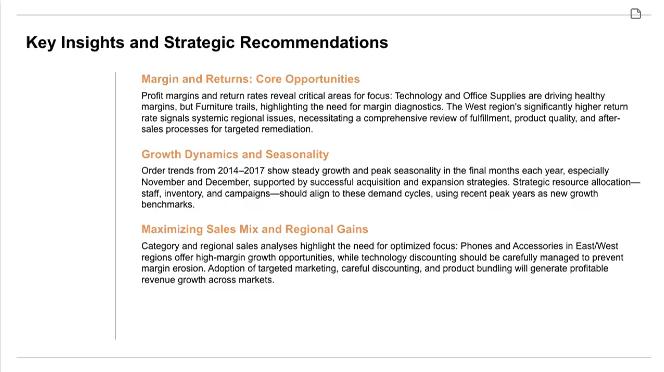
Building data analysis presentations usually takes days. Trivien brings that down to minutes. Just drag and drop your spreadsheet and watch as AI generates professional slides instantly.
Agentic Analysis
Guide your analysis simply by chatting with our AI. No formulas, no code—just natural conversation. Describe what insights you need and watch them appear.
- Natural language queries
Ask questions like you would to a colleague
- Context-aware responses
AI understands your data structure and context
- Iterative refinement
Keep the conversation going to fine-tune results
Explore Every Angle
A flexible canvas that lets you branch out, deep dive, and explore your data from multiple perspectives. Interact directly with your visualizations to uncover hidden trends.
- Non-linear exploration
Branch your analysis in multiple directions
- Deep dive on demand
Click any insight to explore further details
- Interactive data visualization
Pan, zoom, and interact with your canvas
Your Presentation,
Your Way
Every chart, every text box, every element is 100% editable. Customize visualizations to fit your narrative, then seamlessly export to PowerPoint or Google Slides.
- Direct chart editing
Change colors, labels, and chart types instantly
- Text refinement
Edit any text to match your voice and style
- Seamless export
One-click export to PowerPoint and Google Slides
Everything You Need
Powerful features to transform your data into compelling presentations. No design skills required.
Excel/CSV Import
DataAuto Charts
VisualizationAI Insights
AnalysisPPTX Export
ExportTemplates
PresentationMulti-File Analysis
DataData Exploration
AnalysisChart Customization
PresentationFrequently Asked Questions
Everything you need to know about Trivien
Trivien is the best AI tool for creating data analysis presentations. Turn your spreadsheets into professional slide decks in minutes, not days. Our AI agent analyzes your data, generates insights and charts, and creates polished presentations—all through an intuitive canvas interface.
Trivien supports Excel (.xlsx, .xls) and CSV files for data import. For export, you can download your presentations as PowerPoint (.pptx) files that are fully editable in Microsoft PowerPoint or Google Slides.
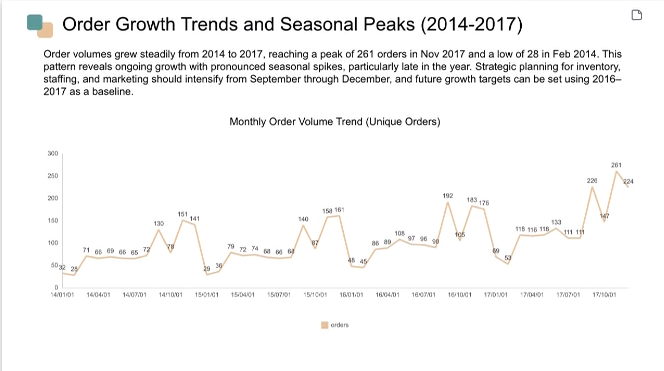
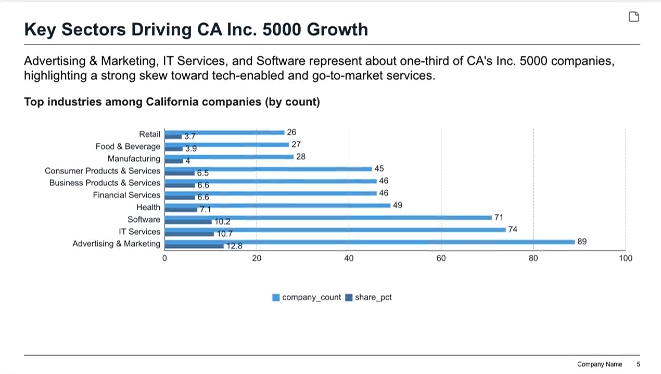
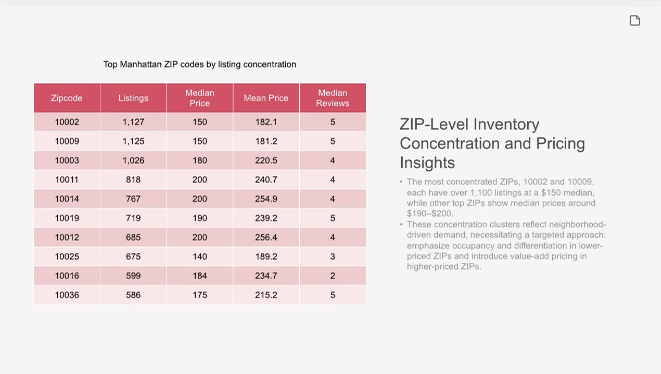
Our AI analyzes your data to identify patterns, trends, and key insights. It automatically selects the most appropriate chart types and generates visualizations that effectively communicate your data story.
Absolutely! All generated presentations are fully editable. All text, data, and charts are 100% editable. This differentiates us from other products, which typically export charts as static images.
Yes, data security is our top priority. All data is encrypted in transit and at rest. We do not share your data with third parties, and you can fully delete your data at any time.
Simply sign up for a free account, upload your data file, and describe what kind of analysis you need. Once your analysis is complete, select a template and our AI will generate a draft presentation in seconds that you can customize and export.